Key takeaways
- Webflow launched MCP 2.0 on July 21, 2026. AI now gets access to your design system, analytics, Agent Instructions and governance (Webflow, 2026).
- Over 30% of Webflow’s enterprise customers already use MCP, and usage has more than quadrupled since January (Webflow, 2026).
- Nearly 90% of all MCP connections today run through Claude (Webflow, 2026).
- The Bridge App is no longer needed in most workflows (Webflow, 2026).
- MCP 2.0 is included in all site plans. You don’t pay extra (Webflow, 2026).
- WordPress has an official MCP Adapter too, but the experience depends on your setup (WordPress, 2026).
- My verdict after testing it is that MCP 2.0 is the first version I would let loose on a production site.
But what does the update actually mean? Is it just another AI feature, or does it change how teams build websites? Let’s start from the beginning.
What is MCP?
Model Context Protocol (MCP) is a shared language between AI and the systems you use every day. MCP was introduced by Anthropic in November 2024 (Anthropic, 2024).
If you’ve used ChatGPT, Claude or Cursor, you already know AI is good at writing text, code and ideas. The problem has been that AI lacked access to the systems we work in every day.
It could tell you how to build a landing page. It just couldn’t build it. It could suggest changes to your CMS. It just couldn’t make them.
That’s exactly the problem MCP solves. Instead of building a new integration for every single AI tool, platforms like Webflow can expose their features through one MCP server that all AI models can talk to.
That means AI is no longer limited to giving advice. It can actually do the work.
Why has MCP become so interesting?
The interesting part isn’t the technology itself. The interesting part is what it makes possible.
We’re moving away from AI as a chatbot and toward AI as an agent. The difference is significant. A chatbot answers questions. An AI agent completes tasks.
That could be:
- creating new CMS pages
- updating existing content
- analyzing website performance
- building new landing pages
- pulling data from other systems
- suggesting improvements based on performance
And things are moving fast. There are now over 10,000 active public MCP servers, and the standard has been adopted by ChatGPT, Cursor, Gemini and Microsoft Copilot, among others (Anthropic, 2025). In December 2025, MCP was handed over to the Linux Foundation as a shared, vendor-neutral standard.
What is Webflow MCP?
Webflow MCP is Webflow’s official implementation of the Model Context Protocol. It connects AI tools like ChatGPT, Claude and Cursor directly to your Webflow project, so they can work on the website itself (Webflow, 2026).
That’s a pretty big difference. AI used to help you build something. Now it can work directly in Webflow.
Among other things, it can:
- read the structure of your website
- create and edit CMS content
- work with components and styles
- analyze performance via Webflow Analytics
- take actions through Webflow’s API
At the same time, AI follows the same permissions as the user. If an employee isn’t allowed to publish changes or edit certain pages, neither is AI (Webflow, 2026).
What’s new in Webflow MCP 2.0?
If MCP 1.0 was about giving AI access to Webflow, MCP 2.0 is about making AI useful in real projects. And in my opinion, that’s the biggest difference.
AI used to help with individual tasks. Now it’s starting to understand the context it works in.
AI now understands your design system
If I had to pick one feature, it’d be this.
The better your Webflow project is set up, the better AI’s output becomes. It can now reuse your components, styles, variables, props, slots and variants instead of inventing its own solutions (Webflow, 2026).
That might sound fairly technical. But it’s actually really simple.
You ask AI to build five new campaign pages. Before, the result could be five pages with new CSS classes, new components and a pile of manual cleanup. Now AI reuses the components, colors and layouts that already exist in your design system.
The result is more consistent and far easier to maintain. For me, this is the biggest reason MCP 2.0 feels like a real step forward. AI doesn’t just get faster. It gets better at working the way professional web teams already do.
I put it to the test
To see how far this actually goes, I connected Figma and Webflow through their MCP servers and gave the agent a simple task: transfer our design variables from Figma into Webflow.
No plugins. No copy-pasting hex codes. Just a single prompt.
It worked better than I expected.
The agent read our Figma variables, understood how they were structured, and recreated the entire system in Webflow. It brought over the primitive variables first, then rebuilt the semantic variables that referenced them. Even the aliases remained aliases instead of being flattened into hard-coded values.
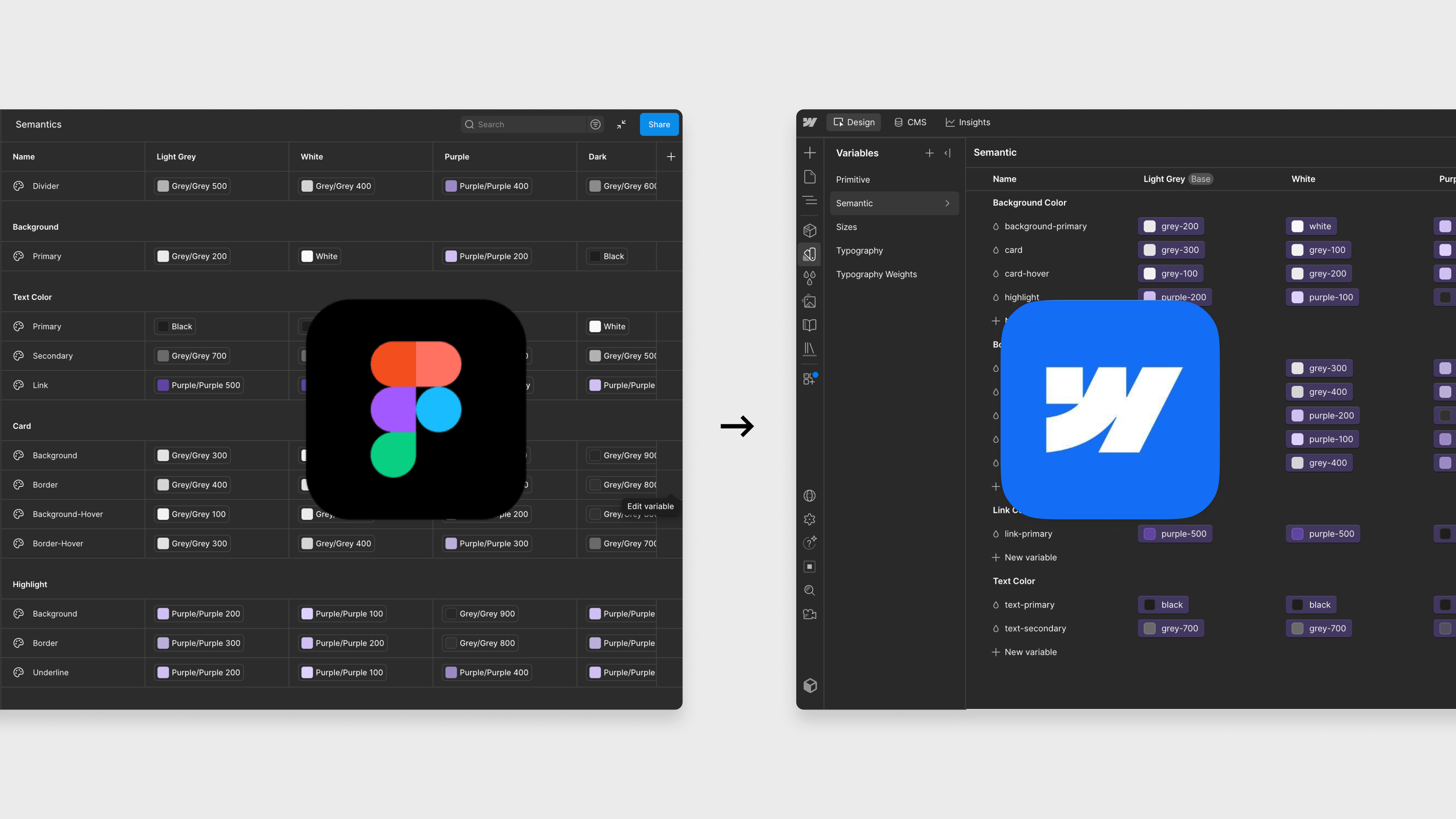
That might sound like a small detail, but it’s actually a good example of what makes MCP 2.0 different. AI isn’t just copying values from one place to another. It’s understanding the relationships inside your design system and rebuilding that structure in a new environment.
There was one important lesson, though.
The output was only as good as the input. Our Figma file already had a clean variable system, with primitives and semantic tokens clearly separated. MCP didn’t create a good design system—it simply transferred one, incredibly quickly.
If your variables are inconsistent, poorly named or duplicated in Figma, they’ll arrive in Webflow exactly the same way. MCP can help enforce the rules you’ve defined and even clean up parts of your system, but it still needs a solid foundation. The better your design system, the better the results.
That experience reinforced something I think will become increasingly important over the next few years: AI rewards teams that already have good foundations. The companies that invest in structured design systems today are the ones that will get the biggest gains from tools like MCP tomorrow.
Stop explaining the same things to AI again and again
If you use AI today, you know the routine. You start a new chat and type “use our tone of voice”, “stick to our design rules” and “always use the primary CTA”. Next time, you start over.
That’s exactly what Agent Instructions solve.
Agent Instructions are fixed rules and skills that AI automatically follows every time it works on your Webflow project (Webflow, 2026). Among other things, they can include:
- brand guidelines
- tone of voice
- design rules
- legal requirements
- naming conventions
- links to components, styles and CMS collections
What’s really useful is that these rules aren’t limited to Webflow AI. They come with you when you work in ChatGPT, Claude or Cursor through MCP. (Webflow, 2026).
If you ask me, it’s an underrated feature. Most companies spend an incredible amount of time getting AI to understand how they work. Now that knowledge can live in one place instead of being written into every single prompt.
Analytics directly in your AI chat
Another feature I think a lot of teams will appreciate is the Webflow Analytics integration.
You used to jump between dashboards and AI tools. Now you can ask AI directly. For example “which pages have grown the most this past month?” or “which traffic source sends the most engaged users?”
AI pulls the data from Webflow Analytics and answers in plain language with traffic trends, top pages and engagement (Webflow, 2026). You analyze your website without leaving the conversation.
It might seem like a small detail. But if you work with hands-on marketing tasks or CRO, it saves a surprising number of clicks over a working week.
To see how useful the Analytics integration actually was, I connected Claude to a Webflow project and asked it to analyze the last 30 days of traffic.
My prompt was simple:
Analyze the last 30 days of Webflow Analytics. Summarize what happened, identify the most engaging pages, highlight any unusual trends and suggest the biggest opportunities.
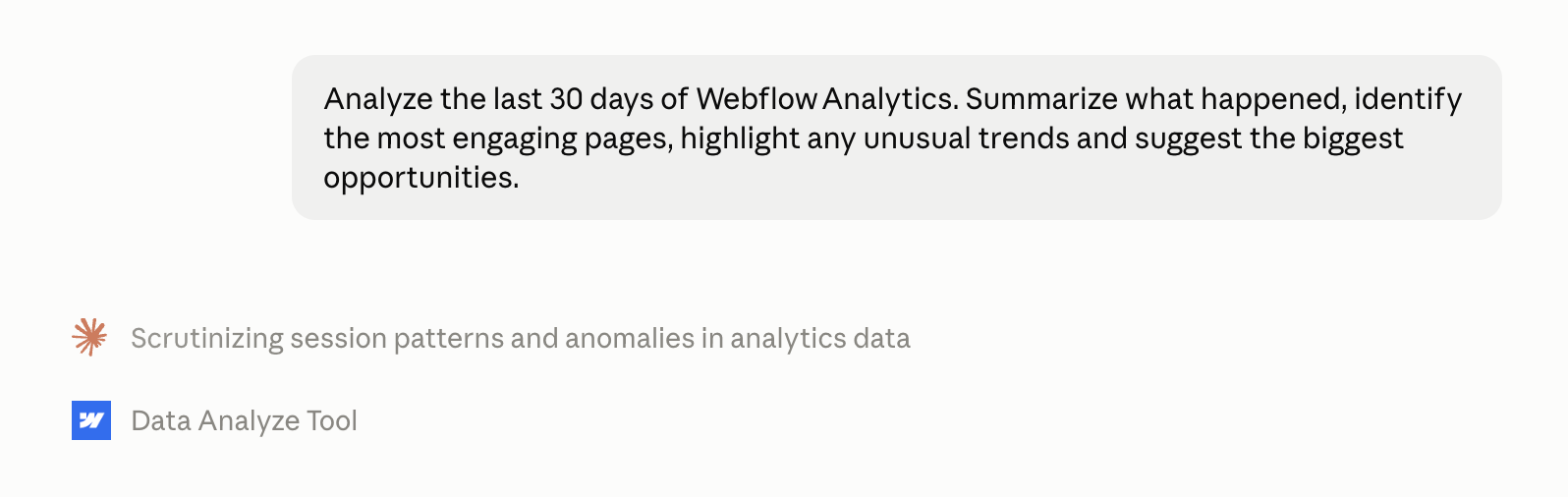
Instead of opening dashboards and clicking through reports, I stayed in the conversation while Claude pulled the data directly from Webflow Analytics.
Within seconds, it gave me a concise summary of the site’s performance. It highlighted which pages attracted the most traffic, where users were most engaged, how different acquisition channels performed, and pointed out trends that were worth investigating further. It also surfaced a few insights I hadn’t specifically asked for, including emerging traffic sources and opportunities to improve the user journey.
What stood out wasn’t that AI could read the numbers. Any analytics platform can do that. What stood out was how quickly it connected the dots and turned raw data into observations and recommendations.
I still see dashboards as essential when you want to explore the data in depth. But for answering everyday questions and getting a quick understanding of what’s happening on a website, this felt like a genuinely different way of working. Instead of navigating reports, I simply asked questions. It also makes analytics much more accessible. Rather than spending time digging through dashboards or learning where everything lives in GA4, you can focus on understanding what the data is telling you and what to do next.
Faster doesn’t mean less control
Something that often gets overlooked in the AI debate is governance. Because what happens when AI is allowed to edit your website? Can it publish something by mistake? Can it change pages it shouldn’t touch?
Luckily, Webflow thought this through. AI gets no more permissions than the user connecting to Webflow. That includes custom roles, locales and access down to individual pages and CMS collections (Webflow, 2026).
On top of that, Webflow introduces three features I think make a real difference.
Branches. The feature has been in Webflow for a long time, but AI can now use it via MCP. Changes can be made and tested in a separate environment before they’re published to your live website (Webflow, 2026).
Activity logs. On larger Webflow projects, activity logs let you follow AI’s changes and see what was changed, when and by whom (Webflow, 2026).
Audit via MCP. The log can be queried directly through MCP. In principle, AI can help review its own changes. That’s especially relevant for larger companies with many editors involved.
What’s the difference between MCP 1.0 and MCP 2.0?
If you’ve already tried Webflow MCP, you might be wondering whether this really is that big an update. The short answer is yes.
The first version was exciting, but it still felt a bit like a beta. MCP 2.0 feels mature. The biggest difference is that AI now works with context instead of just commands.
If I had to sum up the difference in one sentence, I’d say MCP 1.0 made AI able to complete tasks, while MCP 2.0 makes AI able to understand the website it’s working on.
That’s the difference that makes me think far more companies will adopt the technology in the coming year. The numbers already point that way. Usage of Webflow’s MCP has more than quadrupled since January (Webflow, 2026).
Is Webflow ahead of WordPress on AI?
In my view, yes. Let’s dig into why.
Webflow isn’t the only platform betting on MCP. WordPress launched its official MCP Adapter for developers in February 2026, built on top of the Abilities API from WordPress 6.9 (WordPress, 2026). And WordPress is still the giant. The platform powers around 41.5% of all websites (W3Techs, 2026).
After looking at both solutions, though, I think the difference is less about AI and more about architecture.
Webflow is built as one unified platform. Design system, CMS, hosting and analytics all live together. That makes it possible for one official MCP server to understand your entire website.
WordPress works differently. A lot depends on themes, plugins and the individual setup. The MCP Adapter gives AI access to the platform, but how much it can actually do depends on the environment it works in.
That’s why I see Webflow as the most mature option right now, especially for larger websites where governance and consistency matter a great deal. That doesn’t make WordPress a bad choice. But on AI workflows, Webflow is simply a step ahead.
What does MCP 2.0 mean for your team?
I think this is where many people misunderstand MCP. It’s not about AI taking over the designer’s or developer’s job. It’s about removing the tasks nobody finds exciting.
Think about all the work that gets repeated again and again:
- building yet another landing page from the same template
- creating new CMS items
- updating SEO fields
- fixing the same component across 50 pages
- analyzing performance and spotting the same patterns week after week
That’s the kind of work AI gets really good at. Strategy, UX, creativity and quality assurance are still on humans.
And that’s actually the biggest strength of MCP 2.0. It doesn’t try to replace the web team. It makes the web team more efficient.
A strong Webflow foundation matters more than ever
One thing that has really stuck with me is that MCP exposes how well your website is actually built.
If your Webflow project consists of 14 different hero components, styles named “Div 72 Copy”, random margin classes and CMS collections without structure, AI won’t deliver great results either. AI builds on what’s already there.
That’s why I think MCP will push more companies to invest in their design system. Not because AI demands it. But because a good design system suddenly becomes even more valuable.
It’s also one of the reasons we at Kvalifik always prioritize component-based Webflow builds. At our client Veo, 80% of new landing pages were built without a developer, and campaign pages were produced 700% faster. That’s the kind of foundation AI now builds on.
How I would get started with MCP 2.0
In my opinion, you should start with the foundation. Here’s the process I would follow.
1. Find the tasks that take too long
The best AI workflows almost always start with boring tasks. New campaign pages. CMS updates. SEO changes. Translations. Performance analysis. That’s where there’s the most to gain. Don’t start with your most complex design work.
2. Get your design system in order
The better your Webflow project is structured, the better AI’s output gets. So before you let AI loose, ask yourself: Do we have duplicates? Are our components named consistently? Are our styles and variables set up properly? If not, start there.
3. Spend time on Agent Instructions
A lot of people think prompts are the future. I think it’s actually the rules. The more AI knows about your tone of voice, design principles, CTAs and naming, the less time your designer spends explaining it again. Write the rules once, and let them travel with every tool (Webflow, 2026).
4. Give AI the right permissions
Just because AI can publish doesn’t mean it should. Use the roles and permissions you already have. Let AI work with exactly what it needs. No more. No less. That way, AI becomes an extra colleague instead of a risk.
5. Always test changes before they go live
Whether AI or humans do the building, new changes should always be tested before they’re published. If you have access to branches, that’s the obvious route. If not, work on a test page or have AI add new elements separately, so you can review them before they become part of your existing content.
6. Measure whether AI actually saves time
Don’t implement AI because everyone else is doing it. Measure the effect. How long does a landing page take today, and how long in a month? If AI isn’t creating real value, adjust the workflow. Webflow’s MCP Starter Kit is a good place to grab templates and starter skills (Webflow, 2026).
Is Webflow MCP 2.0 ready for production?
If you had asked me about the first version, I would have been more cautious. It was exciting, but it felt like technology still under development.
MCP 2.0 is something else. After reading the documentation and testing the new capabilities, my impression is that Webflow has now built the features that were missing before AI makes sense on professional websites. Design system. Governance. Analytics. Working with branches. Agent Instructions. It’s the combination of those five that makes the difference.
One more thing that’s worth mentioning is Webflow’s version history. If AI makes a change that doesn’t turn out the way you intended, you can quickly roll back. That makes it far easier to experiment with AI without worrying about breaking something.
Is AI perfect? No. Should everything be automated? Also no. But if you work in Webflow every day, I think MCP will be hard to ignore over the next few years.
Not because AI replaces web teams. But because the teams that learn to work with AI will build faster and more consistently than the rest.
Summary
In my view, MCP 2.0 is the biggest AI update Webflow has launched to date. Not because AI suddenly builds perfect websites. It doesn’t. But because it now has the context that makes it far more useful in real projects.
My advice is simple. Get your design system in order, start experimenting with the repetitive tasks, and keep measuring where AI actually saves you time.
I don’t think AI will replace web teams. But I do think the teams that learn to work well with AI will build faster, work more consistently and spend less time on manual work.
Sources
- Webflow, Introducing MCP 2.0 (2026). The official launch page with the feature overview.
- Webflow, MCP 2.0 press release (2026). Adoption numbers for enterprise customers and the Claude share.
- Webflow, “MCP 2.0 is here”, community post (2026). Details on the Bridge App, analytics and workflows.
- Webflow Developers, MCP v2.0 changelog (2026). Technical changes and Designer sessions.
- Webflow, MCP Starter Kit (2026). Setup, starter skills and examples.
- Anthropic, Introducing the Model Context Protocol (2024). The original MCP launch.
- Anthropic, Donating the Model Context Protocol (2025). MCP adoption and the handover to the Linux Foundation.
- WordPress Developer Blog, Introducing the WordPress MCP Adapter (2026). The official WordPress MCP Adapter.
- W3Techs, WordPress Market Report (2026). CMS market share.
All Kvalifik client figures (including Veo) are our own project data.
FAQs
Webflow MCP 2.0 is the latest version of Webflow’s official MCP server. It lets AI tools like ChatGPT, Claude and Cursor work directly in Webflow with access to the design system, CMS, analytics and governance (Webflow, 2026).
MCP 2.0 is included in all Webflow site plans, so you don’t pay extra (Webflow, 2026).
The most used clients are Claude, ChatGPT and Cursor (Webflow, 2026). Nearly 90% of all MCP connections today run through Claude (Webflow, 2026).
In most cases, no. The Bridge App is mainly needed when AI has to see the same thing you see in the Webflow Designer, for example when you select an element and ask AI to change it (Webflow, 2026).
Yes, if you allow it. MCP follows the same roles and permissions as the user, and Webflow recommends working on branches so changes can be reviewed before publishing (Webflow, 2026).
In my view yes, because Webflow is one unified platform with the design system, CMS, analytics and governance in the same MCP server. WordPress has an official MCP Adapter too, but the experience depends on themes, plugins and setup (WordPress, 2026).